This final “Vision of the Future” assignment brought a mix of emotions for me as a teacher and a learner. After having found my footing with the blog posts and feeling comfortable including research and support for my ideas, this assignment felt overwhelming. The added pressure of knowing that the digital artifact should/could be shared publicly definitely made me feel nervous! However, trying (and fumbling my way through) a new technology has given me some confidence in sharing video resources with other teachers, something I likely would have avoided before this course.
When I started this course, I was already thinking about the idea of streamlining digital resources for students, given some of the technical difficulties that come up regularly in the classroom and online. I was focused on healthy media balance, and teaching students the value of metacognition and being aware of how digital distractions impact learning. Although these things are still important to me, these ideas have become part of the larger context of sharing resources with the school community.
Having enjoyed the assignment of how one would facilitate professional development for ICT, I decided to shift my focus from student resources to include staff resources. In my courses for the teacher-librarian diploma, the importance of staff collaboration has come up several times. It is personally one of my favourite aspects of the educational setting, and something that isn’t always capitalized on. We are surrounded by experts in various fields, including teachers who use technology well in the classroom. Although this expertise is often shared within the school, there is no central place where these digital resources are collected and organized for teachers to revisit when needed. There is usually an email with a link to sources or a Slides presentation, but these are one-offs for particular tech, not a central, shared document.
The Google Doc part of the digital artifact was not complicated in itself, though it did present some challenges. Ideally, I would like my resources to be alphabetized, a tool that can be used in Google Sheets. However, when I tried formatting in Sheets, I found that I didn’t have enough room to write the notes or add links in a way that wasn’t frustrating or confusing. I could take the time to copy and paste cells in Docs to make it alphabetical, but besides the time factor and awkwardness of adding resources later, I also thought that maybe the most widely used resources should come first? This is something I would troubleshoot with a team of teachers on a tech committee.
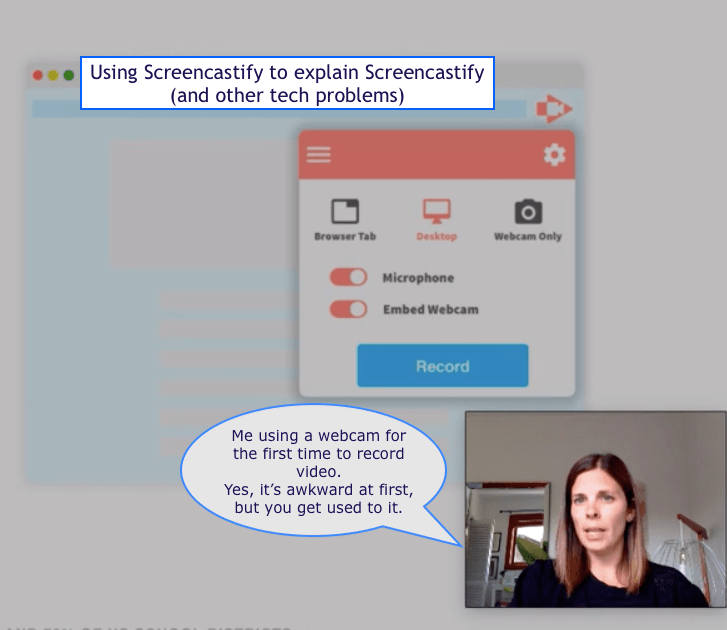
In terms of stretching myself and trying new technology, and modelling the glories of tech trial and error (!), I decided to use a webcam and record myself while teaching a how-to video for Screencastify. I discovered this feature only now, after doing some research on others who had done similar tutorials. (Links to the videos can be found in my previous blog post: Collaboration in teaching and learning ICT).
Besides the typical errors we make when trying to sound professional and seamless in recordings, there were a lot of other road bumps! First of all, it is difficult to model how to use a technology when you are using that technology to showcase learning. The extension has already been downloaded, and you have already started recording, so how can you show learners what it looks like the first time using it?! I got around this the best way I knew – which was to take screenshots of webpages before starting my own Screencastify video, and placing those screenshots into Google Slides. It wasn’t seamless or perfect, but I think it got the message across clearly enough.
I also struggled with the drawing tools, since I like to highlight/focus the mouse, but it turns out that you can’t use those unless it is an active website (which Google Slides is not). I kept recordings of 4 different attempts, but there were about 5-6 others that I just started and deleted after a few minutes. The whole thing took 2+ hours, which sounds lengthy to create what seems like a simple 6-minute video, but a) the time went by quickly! I think I *might* enjoy making these videos; b) next time it would be much faster as I learned so much on-the-spot; c) I think it is worth investing personally, or convincing the district to invest, in the Screencastify upgrade. I wonder if Screencast O’Matic is an easier platform for these types of videos and will definitely speak to colleagues about it when we return to school. The on-the-spot learning is quite valuable, as every time you try a new technology, you have to use problem solving skills and quick thinking; you are also gaining new insights and building on real-time knowledge as you progress through each technological step. These are skills students should also be practicing in the classroom via digital tech.
In the writing of the final assignment, I drew on learning from the various topics we studied this term, and aimed to summarize key ideas from those sources in my reasoning for collaboration and streamlining ICT tools. One big shift from earlier in the course would be my thinking around smartphones. In fact, it was a comment on my blog post “Personal Strategies for Including Better ICT in the Classroom” by another student in the course, Julia, that highlighted this new thinking. She noted that students “need to see teachers use their phone briefly for a professional reason at a responsible time and then put it away, this models the type of behaviour we should expect from them”. Although I am still concerned about misuse of smartphones in the classroom, I feel that I have a much more positive outlook on how they can be celebrated as tools for learning.
Overall, one of my biggest takeaways from this course is that sometimes we need to be reminded that we are lifelong learners, and that the technological world continues to move forward, whether we are along for the ride or not! And that we can close the generational gap, at least to a small extent, when it comes to digital proficiency and reflecting 21st century standards. It just takes a little time, a lot of collaboration, and the willingness to fail forward.
 LIBE Diploma Blog 2020