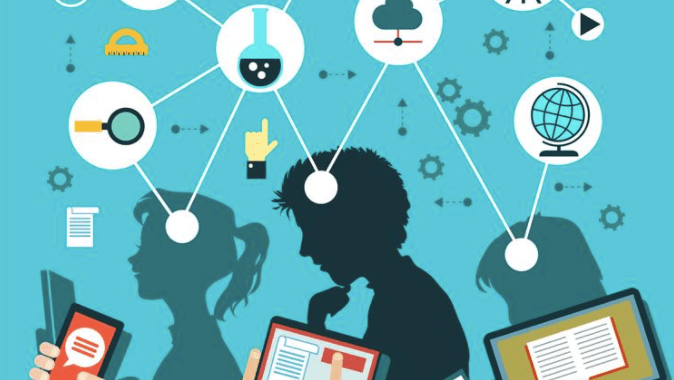
To meet the diverse needs of today’s students, we must provide multimodal opportunities for learning and presenting information that has meaning for them. The teacher-librarian is uniquely positioned as a curator of digital and print tools that serve diverse communities, and as a leader who models collaboration and promotes the individuality of students and teachers. They share information about how to incorporate ADST into classroom instruction, and provide digital support for the school community.
According to Grace Oakley, “Multimodal texts include more than one mode of communication, such as written language, spoken language, visual and gestural modes of communication, movement, image and sound” (160). Allowing students to show their learning through multiple modes, where they are given a choice in how they present information, gives them agency and the opportunity to showcase their unique talents. The Universal Design for Learning (UDL) states that educators should “provide[] flexibility in the ways information is presented, in the ways students respond or demonstrate knowledge and skills, and in the ways students are engaged” (qtd. in Robinson 57).
In addition, one of main philosophies of Makerspaces is that they are “learner-driven” (Makerspace Ed) and that they encourage “creative, ‘playful literacy’” (Meredith, Module 9). Therefore, providing opportunities for collaboration with others in a flexible learning environment is one of the ways to promote the Makerspace philosophy.
Learning and Presenting in Multimodalities: Research Project on the History of Treaties in Canada (Social Studies 9)
In this research project, students worked in the library to gather background information on treaties in Canada, shared this information with their peers, and learned about current events related to land disputes between Indigenous and non-Indigenous groups (or governments).
Here is a list of what they accomplished over several weeks:
- Research on treaties in general, using print and online resources
- Research on a particular group of treaties, using print and online resources
- A map of treaties in Canada from 1725-1921
- A group jigsaw teaching other students about their treaty
- A current events analysis of a land dispute in Canada in the last 30 years
- A collage or Padlet presenting the information on the land dispute in a visual way
- A Noodle Tools Works Cited with their sources for all research information
Students were exposed to various multimodal sources, from digital library collections, to videos on current events, to map reading and creating, to digital collages. This task recognizes the ADST Big Idea for Grade 9, which is that “Complex tasks require different technologies and tools at different stages”. For the purposes of this professional development, I will focus primarily on #5 and 6, explaining how the digital app Padlet helps facilitate the “verbal to visual” (Neill) for students of all abilities.
Using Padlet (or Collage) to show Learning on Current Events
Current events are typically a popular topic amongst high school students, especially when they are given a choice on what event to consider in-depth. This way, they can learn about topics that interest them, such as politics, climate change, social justice issues, science & nature, etc. and they can feel safe in their choices. For example, a student who is LGBTQ+ but who is not ready to share this with their peers, could research a current event around LGBTQ+ issues, under the umbrella of other learning in the classroom, such as the democratic principle in Canada of Human Rights and Equality. They have access to reliable digital resources for news online, something that could be curated in the Library Collections, or through a simple Google Doc or Symbaloo with links to well respected news sites. The great thing about current events is that they can be used in almost all of the curricular content areas.

If you are interested in putting resources together on a certain topic, collaborating with the teacher-librarian is the perfect place to start. As Joyce Valenza explains in “Curation Situations: Let us count the ways”: “K-12 digital curation is about getting our users/students/teachers to the good stuff, pointing them to content and resources they might not themselves discover with their own intuitive strategies, it’s about saving teachers instructional time” (Valenza 1). After all, collaborating with teachers is one of the Standards of Practice for School Library Learning Commons in Canada: “Teachers co-plan learning experiences with [the] teacher-librarian using LLC print and digital resources, spaces, technologies and teaching expertise to address differentiated learning” (CLA 14).
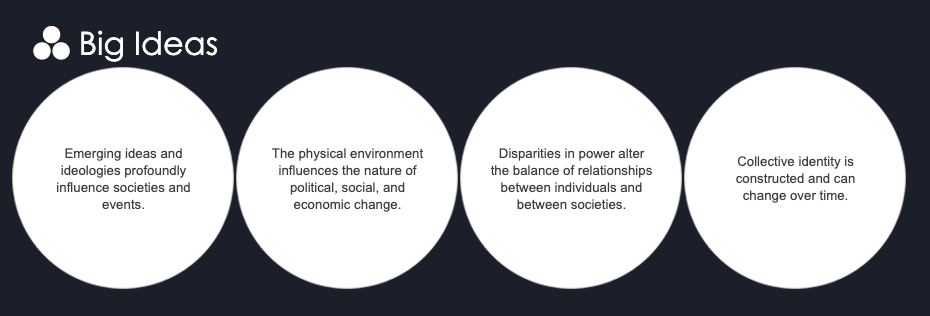
As mentioned, in Social Studies 9, the students did a research project on treaties in Canada. Understanding the history of colonialism and its impact on Indigenous peoples is something that all students in high school should understand. Just like “[d]iverse books are important so that people feel recognized[…] and so that others from outside that group […] can have a better understanding of what it’s like to live as a member of that group or with that identity” (Booknet 20), learning about the issues that affect diverse peoples in one’s country helps break stereotypes and bridges understanding between groups. In addition, the relationships between Indigenous history and Canadian history, connects to all four of the Big Ideas for the course:
- Emerging ideas and ideologies profoundly influence societies and events (colonialist attitudes vs. Indigenous spirituality)
- The physical environment influences the nature of political, social, and economic change (access to land and water resources impacts treaty agreements)
- Disparities in power alter the balance of relationships between individuals and between societies (European settlers, Canadian government as designers of treaties for their own ends)
- Collective identity is constructed and can change over time (Indigenous identity before, during, and after treaties)
As a leader in the school, and one who “support[s] student wellbeing” (Merga 662), the teacher-librarian sets the respectful tone for learning about treaties and Indigenous history. They can help teachers establish a vocabulary for the students, in this case using an authentic and vetted source, FNESC (First Nations Education Steering Committee), and they also curate resources that show various perspectives. This includes both print and online sources, so that students can finesse skills in several modes: “Supporting students in their journey to reach their full potential in the digital arena does not consist solely of providing digital resources and instruction. The analog world informs the digital, and vice versa, and no one is better placed than the school librarian to help students find a balance between the two” (Altobelli 11). These resources are made readily available to students if they need to complete work at home, through online databases and library collections. T-Ls are experts at creating student-friendly digital packages.
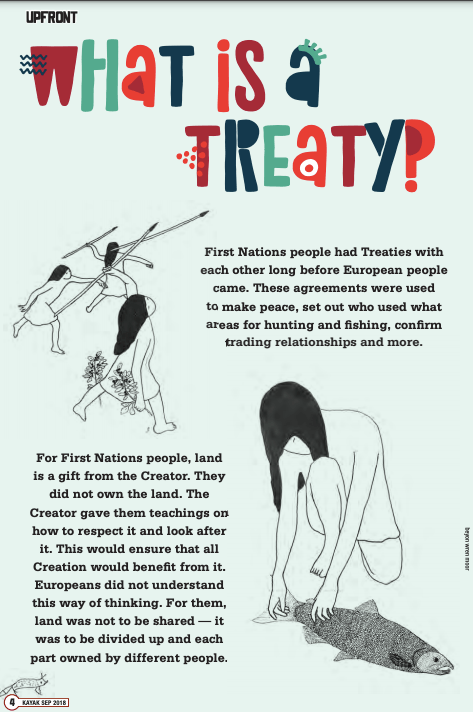
The teacher-librarian posted the PDF pages through an EBSCO link for the students to access.
They also had access to copies of the print version.
Once the students have enough background information on treaties in Canada, this assignment culminates with a current event related to land disputes. Starting with the Oka Crisis in 1990 and ending with modern-day disagreements around treaty rights throughout Canada, students are introduced to various disputes through a Google Slides presentation that summarizes each event, and links to a video (either a summary or a newscast). Presenting the information in this multimodal context appeals to diverse learners, and allows students to hear voices from different sides of the conflict.
It is also a good point to start discussions around word choice and nomenclature, as we compare the language used in the 1990s compared to the language used today. Students are well aware that we use the term Indigenous rather than “Indian” and that there is more sensitivity towards gender equality nowadays compared to 30 years ago. It reminds them that primary sources can provide a window into social attitudes of the past, and how things have changed for the better in many respects (although there is still a lot of work to be done).
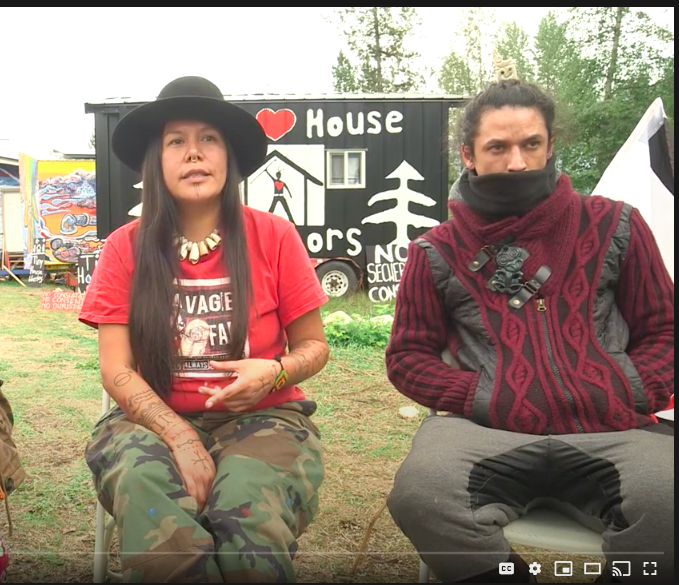
As outlined in the “Applied Design, Skills, and Technologies K-9 – Big Ideas”, “Complex tasks require the sequencing of skills” (Government of BC, Social Studies 9). Before moving on to the visual representation of information on their topic, students research their event using at least two reliable sources on the Internet (a skill that has been facilitated through the teacher and teacher-librarian earlier in the course). One source has been linked for them (modelling good sources), but they are prompted to go to an Indigenous source such as APTN for their second source.
They use these 2 sources to answer questions on their current event:
- The 5Ws – Who was involved in the event? What happened during the event? Where did the event occur? When did the event occur? Why did the event occur? How did the event occur? (4 marks)
- What treaty (look on the treaty map you created earlier in the assignment) covers the land where the dispute is occurring? How is this event related to the issues around treaties that you learned about? Consider the influence of colonialism and imperialism in your answer. (include at least 4 sentences here). (4 marks)
- Record your 2 sources using Noodle Tools and export them to Google Docs, then copy them onto your document before handing in/printing it. (2 marks)
#1 and #3 could easily apply to any current event analysis, while you could replace #2 with an extension specifically related to your own curriculum goals and/or your need to test background knowledge.
Once they have become familiar with the topic, they move on to Part 2 of the assignment: “Collage or Padlet on a Land Dispute in Canada”, where they present their information as a multimedia collage on the event, using the digital tool, Padlet, or creating a collage using paper sources such as magazine cutouts and news article excerpts. Students may work independently or as a pair for this section of the task, sharing their information and insights into the dispute.
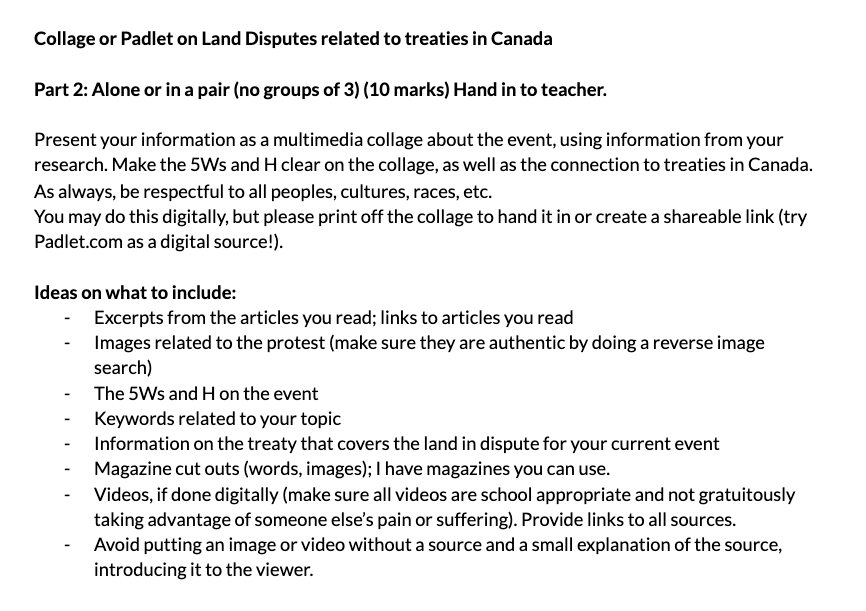
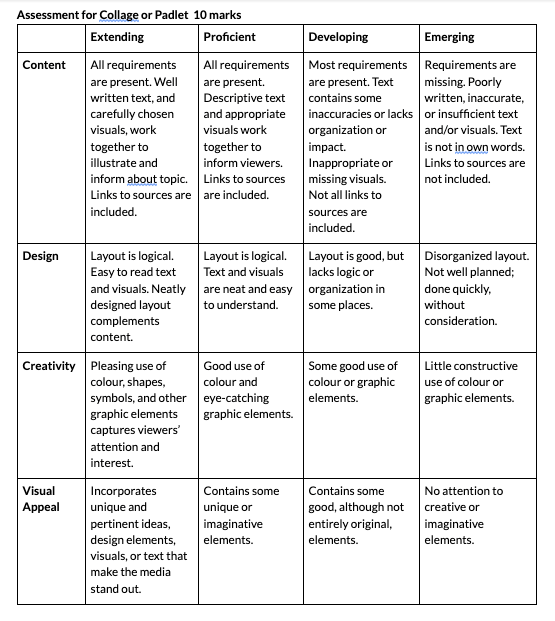
Although I did not have much time to demonstrate how to use Padlet this first time around, it is very user friendly, and the students can use it as part of their Google account, so signing up for it is easy. In the future, I would provide them with an introduction to the basics of Padlet, which I have outlined in this blog post, but which was originally created in Google Docs. Feel free to share this information with your students, and also use to for yourself!
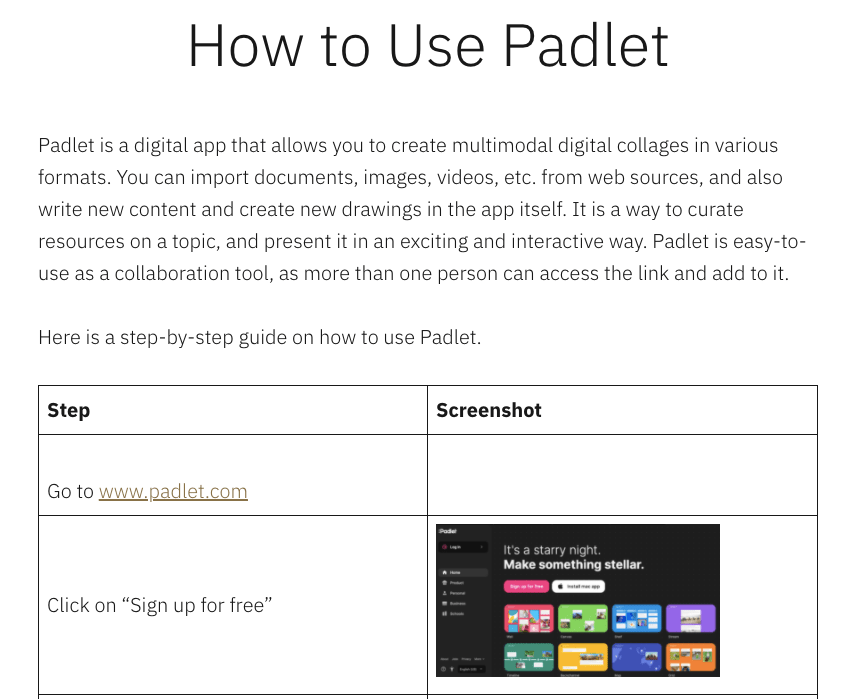
I uploaded this introductory video to Google Classroom after showing the class some of the basic functions. I also went around to each individual or team to highlight some of its uses and to check understanding. Here is a place where the teacher-librarian can co-teach – they might be able to spend more time front-loading students on how to use the technology, and also help with the one-on-one troubleshooting. I spoke to a colleague of mine, who I often collaborate with, about using Padlet, but she opted not to as she “didn’t have the time” to figure out something new in a very time-stretched 2020. However, if teachers can plan in advance to incorporate digital tools such as Padlet into any assignment, the teacher-librarian can lead the way on how to use the tool, since one of their roles is to “foster student and teacher technological capacities and digital literacies” as part of the CLA’s standards of practice (CLA 15).
Once the students had a general knowledge of Padlet, they worked independently and were able to self-start on the task when we went back to it several days later. The class that did this assignment is a diverse group with a wide range of abilities, and one thing many of them struggle with is self-regulation and/or self-starting. So watching them successfully complete this digital task without much coaxing from me was incredible.
The results for the Padlet on Land Dispute were also impressive, and a number of students fared better on this task than they had previously performed on similar tasks. Students who struggle with written output were able to showcase their learning more visually, which led to positive results. Just like David E. Robinson noted in his own experience as a T-L: “I recognized that many of the frequent student library patrons and student library assistants demonstrated strong technical aptitude […] these students were able to express their knowledge in forms other than customary paper-and-pencil tasks” (57).
In addition, there was a lot of variety in the completed Padlets, which showed that the students had personalized their digital collage to reflect their own thinking and personalities. They were asked to curate their own sources for the collage, sharing videos and images they vetted themselves. One of the great features of Padlet is when you add a new “pad” to your Padlet, the magnifying glass/microphone icon (what I call it!) allows you to search the Internet for everything from videos to gifs on a search query. Because the students already had the research background on their topics, they were able to discern reliable and accurate sources for their Padlets.
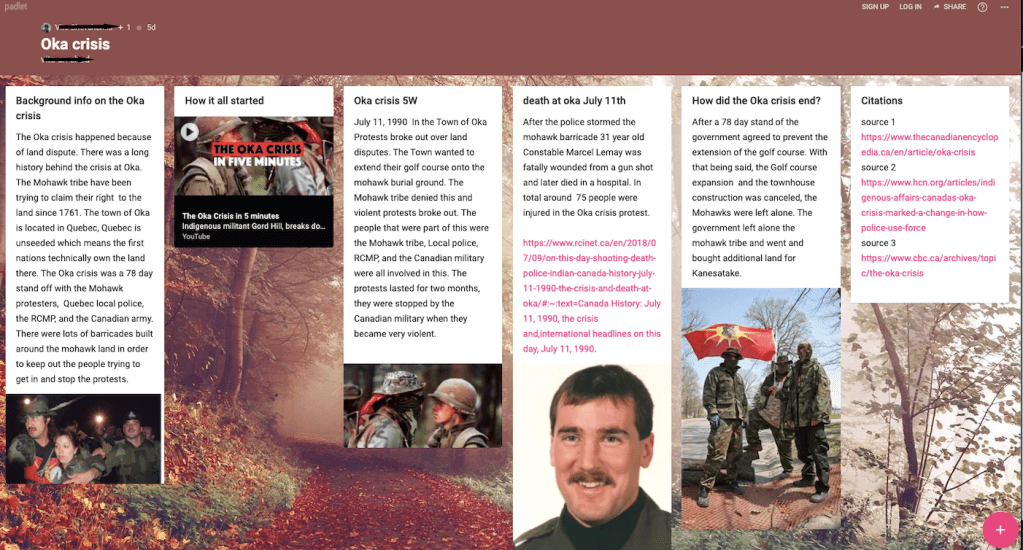
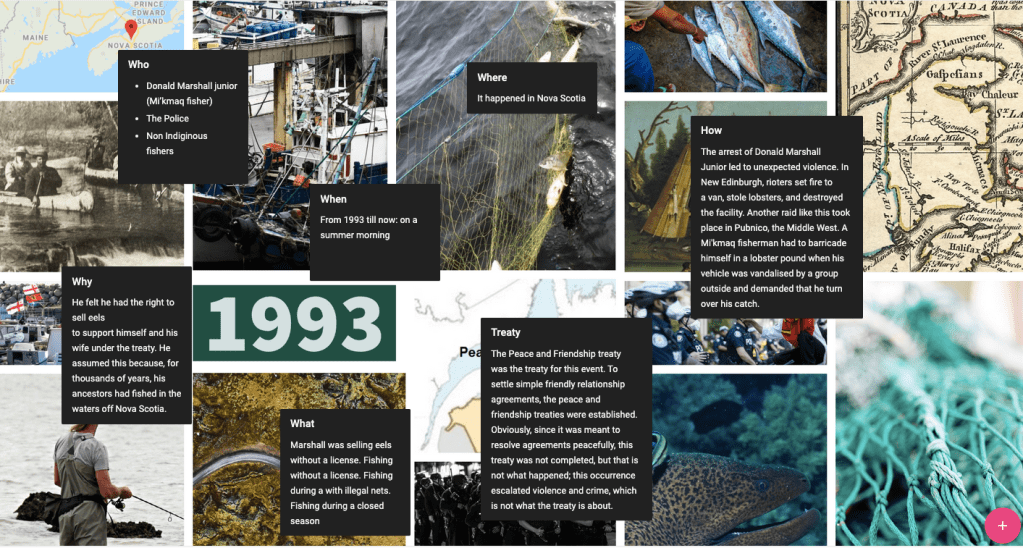
And because they are Social Studies students, they learn that citing sources in one of the most important skills in education. Part of the assessment for the Padlet was to give credit to the sources used. Although I did not specifically ask for a Noodle Tools Works Cited for images, videos, etc. (a title, short description introducing the source, and a weblink would have been sufficient in this case), because the students had learned how to use Noodle Tools as part of their earlier research on both the treaties and current events, many of them just naturally did one. MY STUDENTS MADE A NOODLE TOOLS WORKS CITED WITHOUT BEING ASKED.
This is an incredible outcome and what every teacher-librarian and teacher of humanities hopes for. Joy Valenza aptly states that “When librarians model and guide curation, they build more independent, agile learners capable of building learning networks, telling powerful stories, and carving out their own information niches. We may also guide learners as they develop digital portfolios to share their own curated work” (Valenza 1-2). The Padlet is a perfect example of this type of digital portfolio, where students have found the sources themselves, based on knowledge they have built through research and inquiry skills taught in the school library.
A simple digital tool that teachers can use is an online survey such as Google Forms or Survey Monkey to determine student opinion on topics and assignments. This is another place the T-L can help you if you are unsure where to begin. You can also use this tool to gauge background knowledge on a topic, or to find common interests among students, which could help guide course content.
After the treaties assignment, I created a quick survey on Google Forms for the students on Padlet-use:
- What did you like about using Padlet?
- What did you find challenging about using Padlet?
- Would you use Padlet again for projects that require a visual/multimedia element?
- How would you rate Padlet out of 10 as a student resource?
The results were very positive, with 100% of the students responding “Yes” to number 3 – that they would use the digital platform again for projects. Of the 10 who completed the survey, 60% rated it a 10/10, while 30% gave it 8/10, and 1 person rated it 7/10. Below is a screenshot of the responses for 1 and 2, but in summary, students liked how it was easy to use, “fun”, and customizable. One student explained: “I liked padlet a lot, you can work with other people on a document and create a collage online, it’s great for the times right now and people can make collages without having to be in the same room. You could design it and make it your own as well”. Another student noted “I liked how you could search stuff on the web from the site and I really liked the layout”.
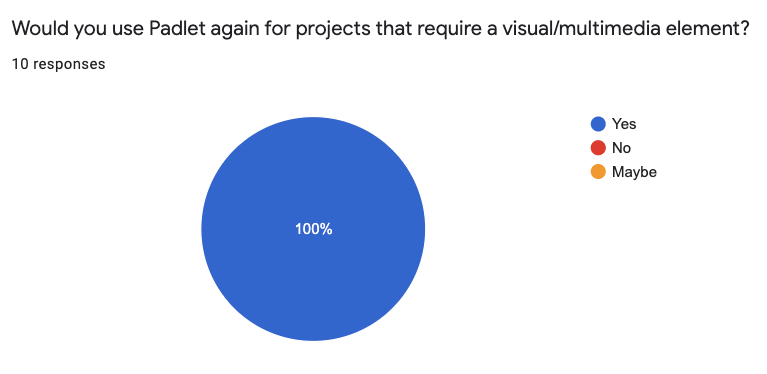
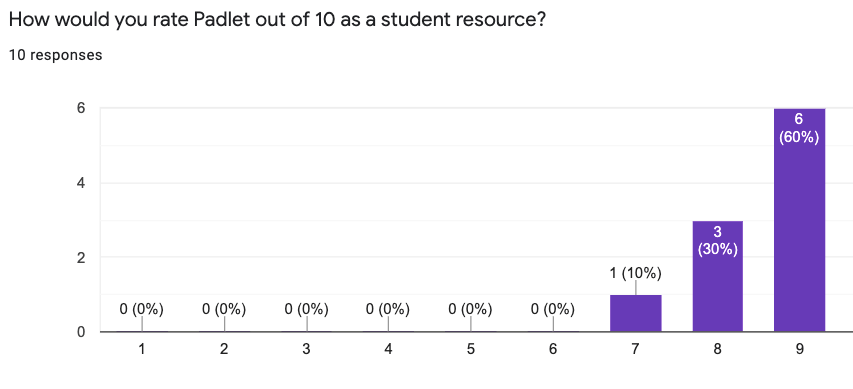
UDL is founded on the principles of three primary brain networks, according to the Center for Applied Special Technology. David E. Robinson explains that “The Recognition Networks [of the brain] are best supported in learning environments that include multiple representations of concepts and provide flexibility in modality, explanations, and examples (CAST 2017)” (58). Students were provided with print materials (Kayak magazine, a laminated map for reference) that were also available online for the research portion of the task. Moreover, for the “verbal to visual” portion of the assignment, students could choose to create a collage by hand rather than use a digital app like Padlet. I have a habit of collecting old magazines just for this purpose, and the teacher-librarian might have a store of similar resources available for creative tasks.
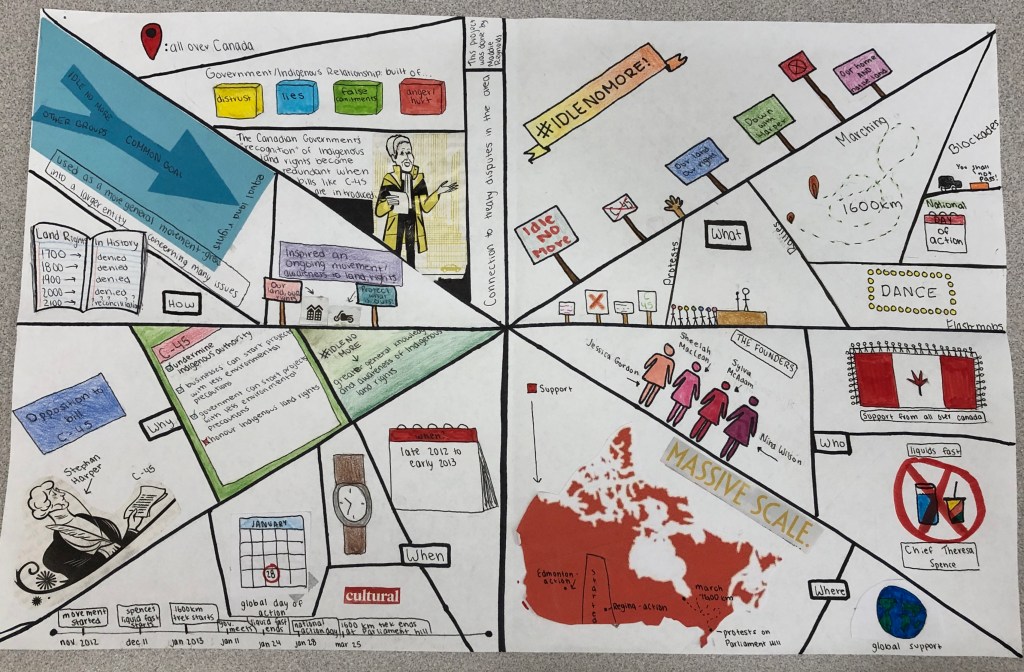
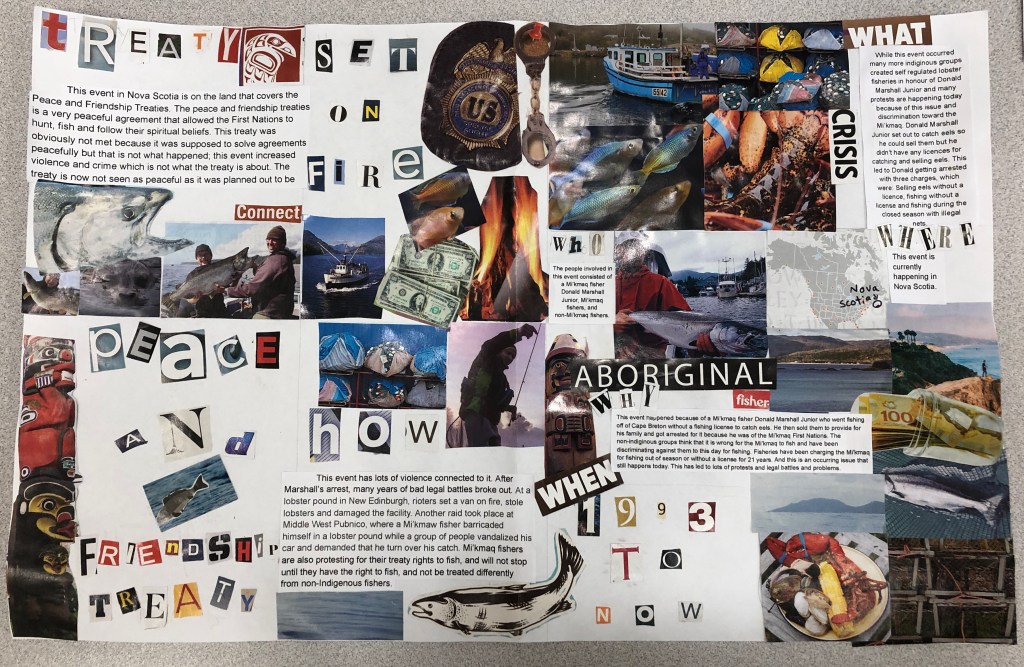
About ⅓ of the class choose to do a collage by hand; the hands-on aspect of flipping through magazines, cutting out images (processing and curating the entire time, making connections to previous learning), and designing a way to present the images and information is similar to the elements of Makerspaces, where there are often “loose parts” that do not have meaning individually, but when placed together thoughtfully, tell a new story or perspective. The two examples, “Idle No More (Collage 1)”and “Mi’kmaq Lobster Dispute (Collage 2)” are vastly different in their image choices and layout, but both are visually appealing and present the information with expertise. Graphic design of this type requires higher level thinking, so although a collage may sound like a simple endeavour, making critical choices and connections with clarity and inventiveness is actually a “complex task [that] requires a sequencing of skills” for success (Government of BC, ADST). And like Makerspace activities, the possibilities for creation are endless when students have agency over their own learning, and are allowed to play within the parameters of an artifact.
As Grace Oakley explains, “Because they are difficult to disentangle, Merchant (2008) has suggested that traditional print-based (older) and newer digital literacy skills and practices are best taught together in a parallel or integrated fashion” (161). This assignment on treaties in Canada offered these more traditional skills in conjunction with digital literacy, both of which have critical analysis as the end goal. Presenting information in various formats and with multiple web applications can be daunting as a teacher working singularly. However, there are several opportunities for collaboration with the teacher-librarian on research topics that connect with your specific curriculum. Students also benefit from these multimodalities when they are immersed in these complex issues, and in turn, create their own multimodal interpretations of the content to share with others.
Works Cited
Altobelli, Rachel. “Creating Space for Agency.” Knowledge Quest, vol. 46, no. 1, Sept.-Oct. 2017, pp. 8-15.
Booknet Staff. Demand for Diversity: A Survey of Canadian Readers. Compiled by BNC Research, Booknet Canada, Apr. 2019.
(CLA) Canadian Library Association. Leading Learning: Standards of Practice for School Library Learning Commons in Canada. 2014. http://llsop.canadianschoollibraries.ca/wp-content/uploads/2016/09/llsop.pdf. Accessed Oct 27 2020.
Delvechhio, Jennifer. “Module 9: Supporting Learners as Inquirers & Designers.” LLED 462-63A, University of British Columbia, November 2020.
Government of British Columbia. “Applied Design, Skills, and Technologies.” BC’s New Curriculum, 2018/2019, curriculum.gov.bc.ca/curriculum/adst. Accessed 17 Nov. 2020.
—. “Social Studies 9.” BC’s New Curriculum, 2018-2019, curriculum.gov.bc.ca/curriculum/social-studies/9. Accessed 17 Nov. 2020.
“Maker Ed: The Impact of Maker Education.” YouTube, uploaded by Maker Ed, 6 May 2015, http://www.youtube.com/watch?v=3Ml9j1UkeI4&feature=emb_logo&ab_channel=MakerEd. Accessed 3 Nov. 2020.
Merga, Margaret. “How Can School Libraries Support Student Wellbeing? Evidence and Implications for Further Research.” Journal of Library Administration, vol. 60, no. 6, July 2020, pp. 660-73, doi.org/10.1080/01930826.2020.1773718. Accessed 17 Nov. 2020.
Neill, Doug. “Drawing Basics for Sketchnoters.” YouTube, 21 Sept. 2018, http://www.youtube.com/watch?v=po0IEYeLlq4&feature=emb_logo&ab_channel=VerbaltoVisual. Accessed 3 Nov. 2020.
Oakley, Grace. “Engaging Students in Inclusive Literacy Learning with Technology.” Inclusive Principles and Practices in Literacy Education. Bingley, Emerald Publishing, 2017, ebookcentral.proquest.com/lib/ubc/reader.action?docID=4826803&ppg=140. Accessed 17 Nov. 2020.
Robinson, David E. “Universal Design for Learning and School Libraries: A Logical Partnership.” Knowledge Quest, vol. 46, no. 1, 09/01/2017, pp. 56-61.
 LIBE Diploma Blog 2020